
How do I share workouts with my clients?
In TrainerStudio you don't send workouts, you share them in your app. Instead of sending your client a PDF or an Excel file over WhatsApp or email, you send them a link to your app: an app with your logo, your name and your colors. Your client installs it on their phone and from there they:
- see their training for each day: exercises, sets, reps, weights, rest and videos;
- see their nutrition plan or diet;
- log their progress: the weight and reps of every set, their metrics and their photos;
- give you feedback: comments on each exercise and messages in the chat.
For your client it is their coach's app, not one more file on their phone. The experience feels much more professional, and you always see whether they train and how it is going.
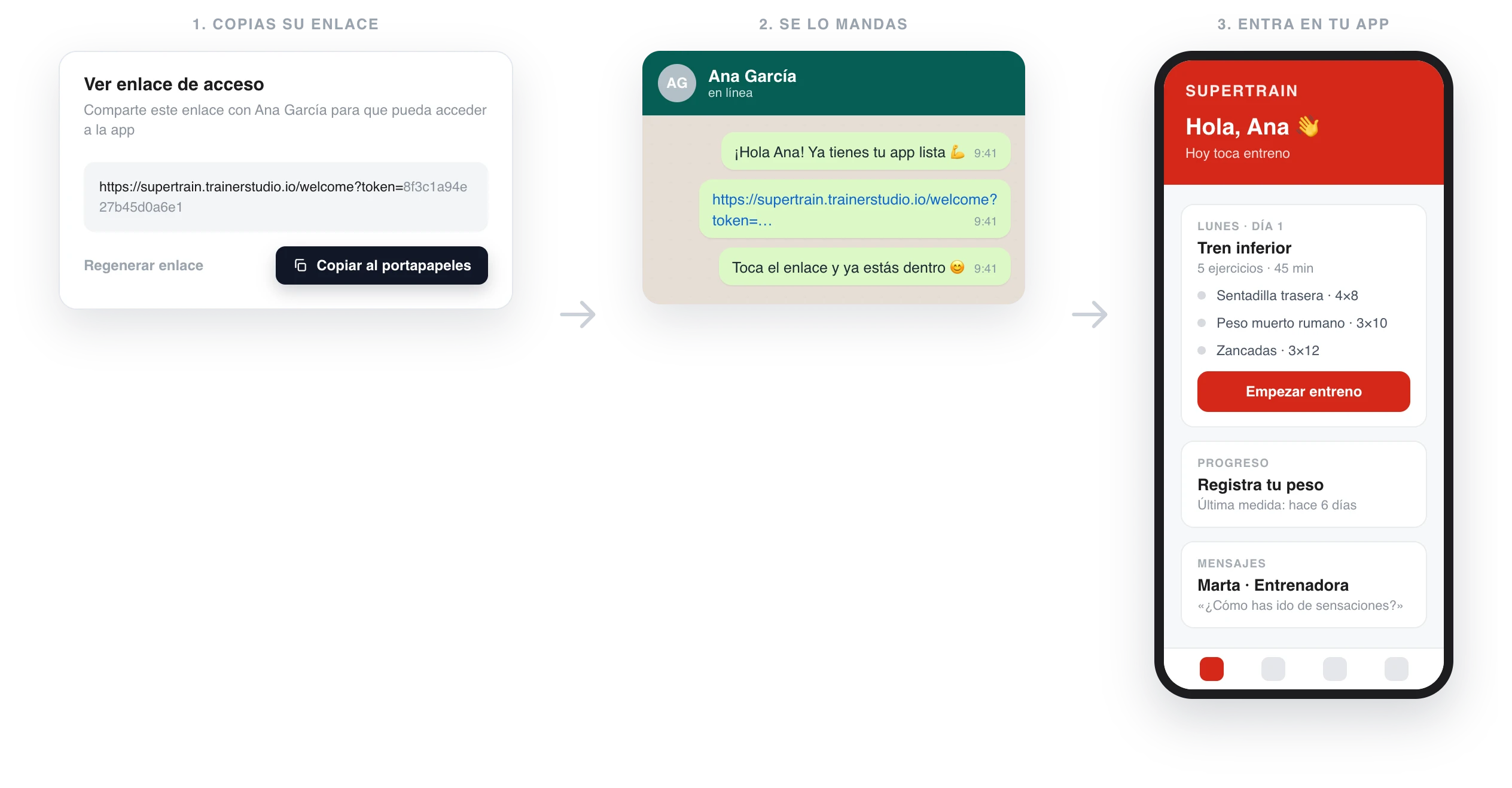
You copy your client's link, send it and they open their workout in your app.
App or PDF: why share the workout in the app
| Workout in your app | Workout as PDF or Excel | |
|---|---|---|
| Brand | Your logo, your name and your colors | A generic file |
| Changes | You edit the workout and your client sees it right away | Export and send it again |
| Progress | Your client logs weights, reps, metrics and photos | Nothing is recorded |
| Feedback | Comments per exercise and chat with you | Over WhatsApp, outside the plan |
| Nutrition | Training and diet in one place | Another separate file |
How to share the workout, step by step
1. Customize your app (once)
Go to Settings > Customize App, upload your icon and logo, set your app's name and pick your color. That is what your client sees on their phone. Details in How to customize your app.
2. Assign the workout to your client
Build the workout in your client's plan or assign them a program from your library. As soon as you save it, it is in their app: there is nothing else to send. How to do it in How to create routines and Create and assign programs.
3. Send them the link to their app
Each client has their own access link. Copy it from Clients → Options → View access link (or right after creating the client, with Copy app link) and paste it into WhatsApp, Telegram, email or Instagram. They tap it and land straight in their workout, without signing up. Step by step in How to give clients access to the app.
A message that works well:
Hi Anna! Your workout is ready in my app 💪 Open it from here: [paste the link] Add it to your phone's home screen so you always have it at hand. Log the weights you lift and message me in the chat if you have questions.
4. Have them install the app
It installs from the same link, without going through the App Store or Google Play, in two taps. Installed, it opens full screen with your icon and gets notifications. How to do it on iPhone and Android: How does my client install the app?.
What your client sees and does in the app
- Today's workout, with each exercise, its sets, the video and your instructions. See How to prescribe exercises.
- Logs what they do: weight and reps of each set. You see their progress per exercise in Log exercise weight and track progress.
- Leaves you comments on each exercise and writes to you in the chat.
- Their nutrition: the diet plan you assign them. See Nutrition.
- Their metrics and progress photos: weight, measurements and photos they send you. See How to track progress with metrics.
To see exactly what your client sees, use How to view the app as your client.
What if I need the workout as a PDF or Excel file?
You can also download the workout as a PDF or Excel file, for example to print it or for a client who trains without a phone. The file is a copy: if you change the workout it is not updated, and your client cannot log their progress or give you feedback. How to do it in Export workouts to PDF and Excel.
Frequently asked questions
How do I send the workout, program or training plan to my client or athlete? Assign it in their plan and send them the access link to your app. No files needed: they see everything in the app, always up to date.
Do I have to send the workout every time I change it? No. Your client always sees the current version in their app. You send the link only once.
Can I share the same workout with several clients? Yes: save it as a program in your library and assign it to each one. But each client signs in with their own link: never send one client's link to another client or to a group.
Does my client have to pay or sign up? No. Their account is created when you add them, and they sign in with their link.
Can my client download the app from the store? Yes, by searching for «TrainerStudio» in the App Store or Google Play. It is the same app, but with TrainerStudio's name and icon instead of yours, and they sign in with email and password.
How does my client install the app?
Your client installs the app from their own access link, without going through any store: two taps on iPhone and two on Android. The icon stays on their phone with your logo, your name and your colors.
How to customize your app?
Set up your app's name, icon, logo, and colors so your clients see your brand, not TrainerStudio's.