
How does my client install the app?
Your client does not need to download anything from the App Store or Google Play. The app is installed from their own access link: they open the link in the browser and, from there, add it to the home screen in two taps.
It is worth them doing it. Without installing it, the app works the same but opens inside the browser. Once installed:
- it opens full screen, without the address bar, like any other app;
- it carries your logo, your name and your colors if you have your custom app;
- and it is the only way for them to get notifications.
First things first: the link has to be opened in Safari (iPhone) or Chrome (Android). If your client opens it from the in-app browser of Instagram, WhatsApp or TikTok, they will get into the app but the install option will not appear. They should copy the link and paste it into the browser.
On iPhone
With Safari —on iPhone, installation only works from Safari, not from Chrome or other browsers—:
- Open the access link and press the share button in the bottom bar
- Scroll down the menu and choose «Add to Home Screen»
- Confirm with «Add»
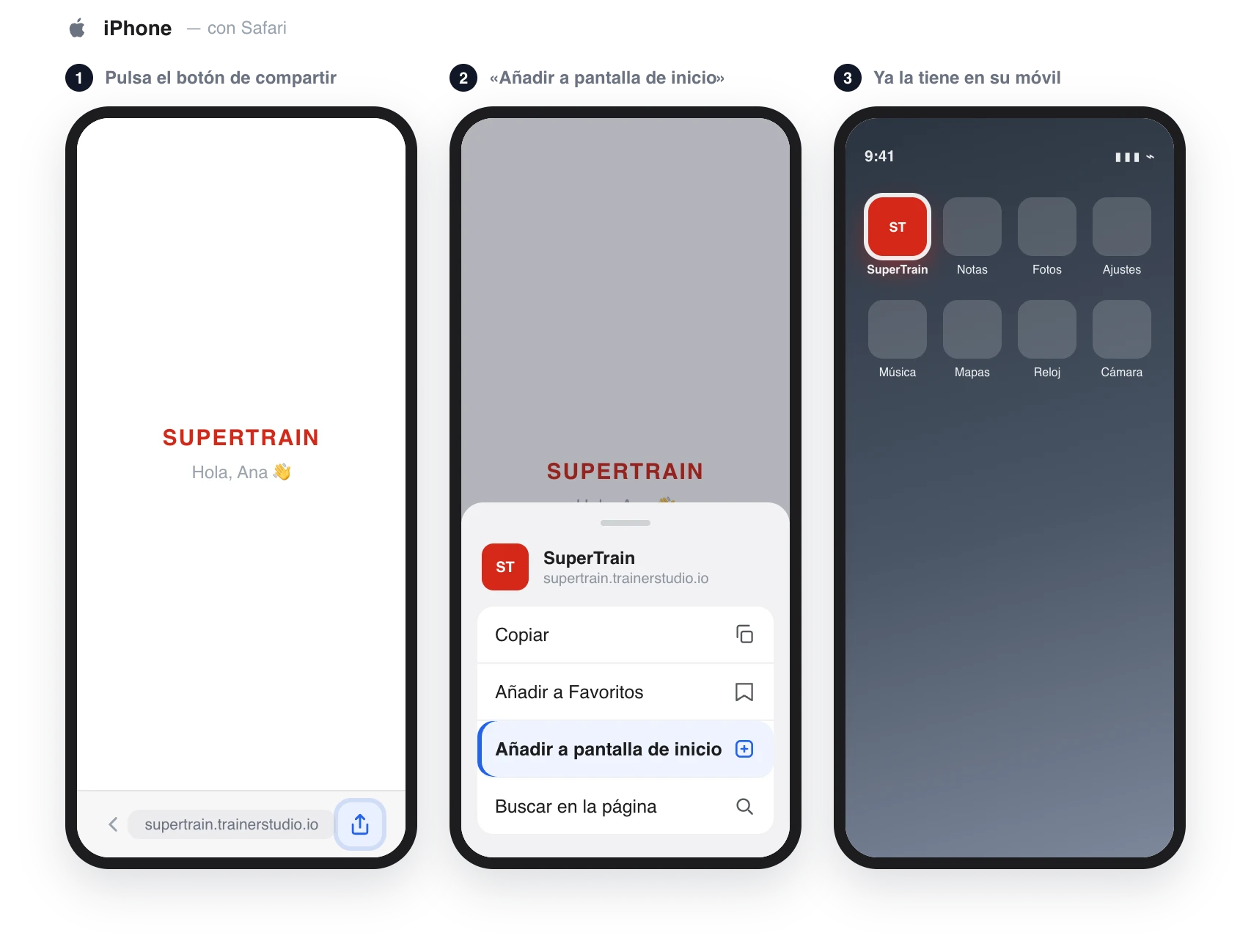
On some iOS versions the share button is behind the «•••» button in the bar.
On Android
With Chrome:
- Open the access link and press the three-dot menu at the top right
- Choose «Install app» (on some phones it appears as «Add to Home screen»)
- Confirm
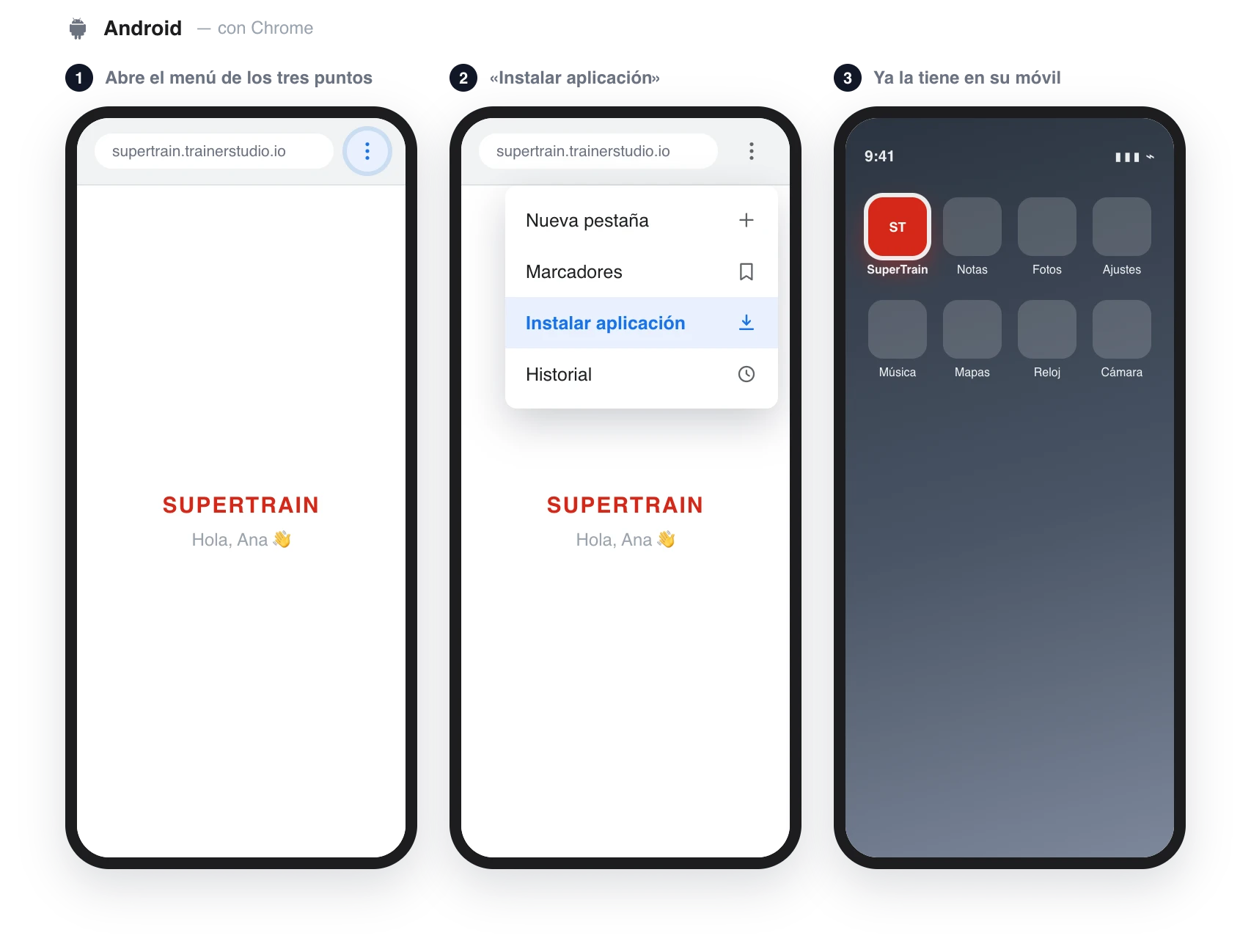
From then on your client gets in by tapping the icon, without needing the link.
The alternative: the store app
If your client prefers to download it from their usual store, they can search for «TrainerStudio» on the App Store or Google Play. Inside it is exactly the same app —same workouts, same chat, same metrics—, with two differences:
- It carries the TrainerStudio icon and name, not yours.
- They sign in with email and password, not with the link. Your client creates them the first time they come in through the link, on the «Complete your account» screen; you can also set a password for them from «Options» → «Set password».

Many coaches use both routes: they share their link and, if a client struggles with installing from the browser, they tell them to search for «TrainerStudio» in their store.
Send it ready-made
If you would rather not explain it yourself, the client manual has these same steps with screenshots and you can send it as is: Install the app.
Frequently asked questions
Is installing the app mandatory?▼
No. With the access link your client can use it from the browser, even on a computer. But installed, the experience is better —full screen, your brand— and it is the only way for them to get notifications.
«Add to Home Screen» does not appear. Why?▼
It is the number one cause of «it doesn't work»: they opened the link inside Instagram, WhatsApp or TikTok, and those in-app browsers do not allow installing. They should copy the link and paste it into Safari (iPhone) or Chrome (Android). On iPhone, in addition, installation only works from Safari.
Is the app installed from the browser worse than the store one?▼
No, they are the same app inside: same features, same workouts, same chat, notifications included. The difference is on the outside: the one installed from the browser carries your brand, the store one carries TrainerStudio's.
What if they delete the app from their phone?▼
They do not lose anything: their data stays in their account. They open their access link again —or sign in with their email and password— and install it again if they want.
Does it also work on a computer?▼
Yes. The same link opens the app in desktop Chrome, Safari, Edge or Firefox, with the same account and the same data.
Next step
- How to give my clients access to the app?
- How to customize your app? — your logo, your name and your colors
- How to view the app as your client sees it?
How to give my clients access to the app?
Each client has their own access link. You send it by WhatsApp, they tap it and they are in the app already signed in —no sign-up—. The first time they create their email and password, and from there they can install the app on their phone.
How to customize your app?
Set up your app's name, icon, logo, and colors so your clients see your brand, not TrainerStudio's.