
Sets from your instructions (AI-suggested sets)
If you prescribe in writing, like "4x12 with 20 kg, RIR 2" or "4x400 m at 3:45/km, 1' rest", you don't have to copy those numbers into the sets table by hand. When you save the exercise instructions, TrainerStudio's AI reads them and proposes the sets already filled in. You decide whether to apply them.
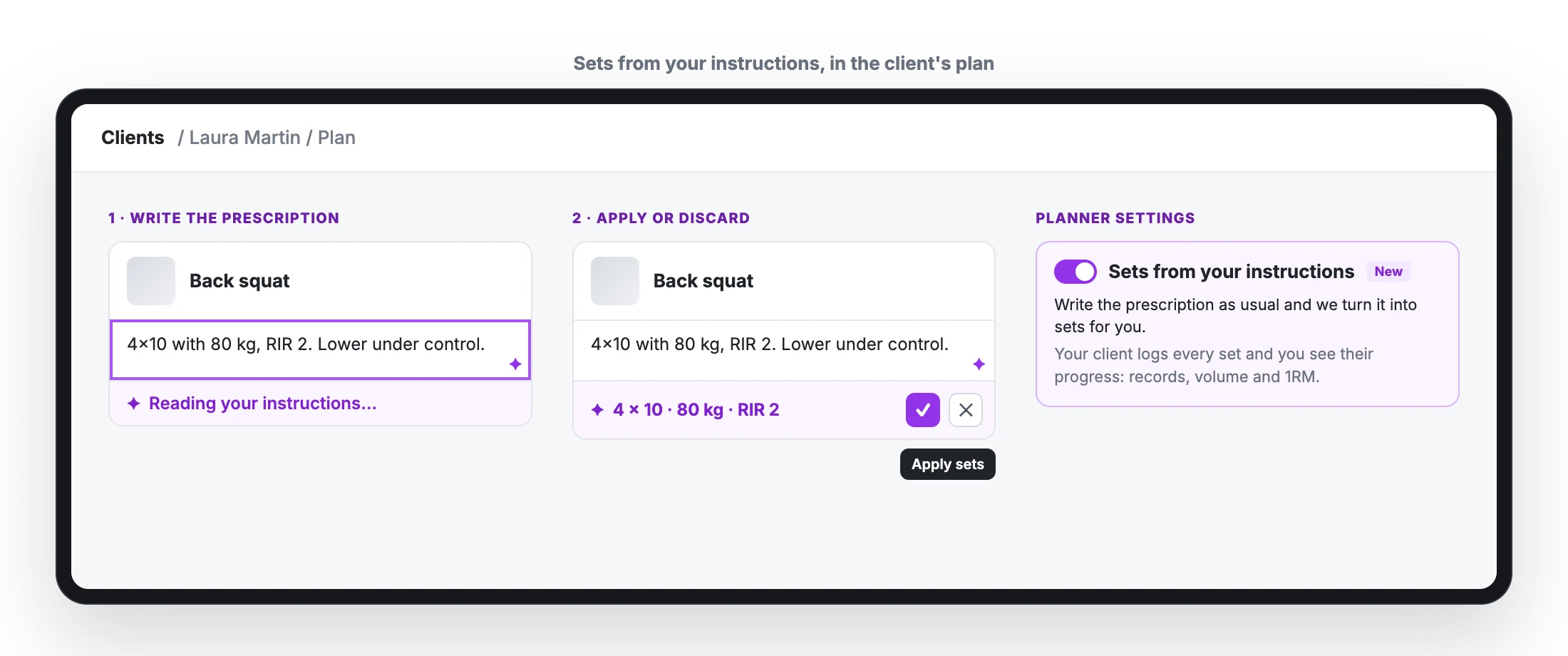
You write the prescription, the AI reads it and you apply the sets in one click.
It works in each client's plan and in the programs in your library.
Why filled-in sets pay off
With the sets in the table, your client logs every set (weight, reps, RIR…) and you see their progress: records, volume and 1RM. If the prescription stays in the text, there is nothing to log or measure. More in Log exercise weight and track progress.
How it works
- Open an exercise in the client's plan or in a program.
- Write the prescription in the instructions field (Add instructions), as usual. For example:
4x12 with 20 kg, 90" rest. - Leave the field to save. Reading your instructions… appears below it; you can keep working in the meantime.
- A few seconds later you see the proposed sets, with a ✨. For example: 4 × 12 · 20 kg.
- Click ✓ Apply sets to move them into the table, or ✕ Discard to leave it as it was.
If the exercise already had different sets, you see the current ones struck through above the proposal. The buttons become Replace sets and Keep my sets.
The instructions don't change: your client still sees them as they are. A proposal you apply or discard doesn't come back for the same text.
What it understands
It reads prescriptions with a number of sets, like 4x10, 3 × 8, 3 sets of 12 or three sets of twelve, and also:
- Load: kg or lb, % of 1RM and ranges (
8-10 reps). - Intensity: RIR and RPE (
@8is RPE 8). - Rest and time:
90",1'30,1:30, timed sets and holds per set. - Endurance: distance, pace (
at 3:45/km) and repeated blocks. - Warm-up or ramp-up sets, when they have their own numbers.
- Four-phase tempo (
3-1-1-0).
It proposes nothing when the text doesn't prescribe sets: technique cues, an AMRAP, "2-3 sets" with no reps or load, or "10 per side" with no number of sets. Per side doesn't multiply sets: 2x15 each leg is 2 sets of 15.
The ✨ and how to turn it off
The ✨ in the corner of the instructions shows the feature is on. Hover over it (or tap it on mobile) to see what it does and turn it off:
- In a client's plan: click Turn off in settings. The Planner settings open (also in the Plan menu → Planner settings) with the Sets from your instructions switch.
- In a program: the Propose sets switch is inside the same ✨ box.
It's your own setting: it applies to all your clients and programs, and you can turn it back on whenever you want.
FAQ
Is this the same as the AI assistant? No. This only turns an exercise's instructions into sets. To ask for plan changes in your own words, use the AI assistant.
Are the sets applied on their own? No. They are always proposed and you decide with ✓ or ✕.
I don't see the ✨. Check that the Sets from your instructions switch is on in the Planner settings. If you don't see the switch either, your account doesn't have the feature yet.
Can I edit the sets after applying them? Yes, like any other set. See Prescribe exercises.
Advanced sets
Guide on how to prescribe exercises with free-text instructions and log workouts with precision to obtain advanced statistics in TrainerStudio.
Export workouts to PDF and Excel
Download library programs and client plans as PDF or Excel files: format, period, contents, and steps to save or share the file.