
Training variables
A training variable is anything you can prescribe and measure in a set: reps, weight, rest, distance, pace… In the set editor, each variable is a column, and you decide which ones each exercise has.
This guide is the reference for every available variable. If you are looking for how to add or change them in the editor, see How to prescribe exercises.
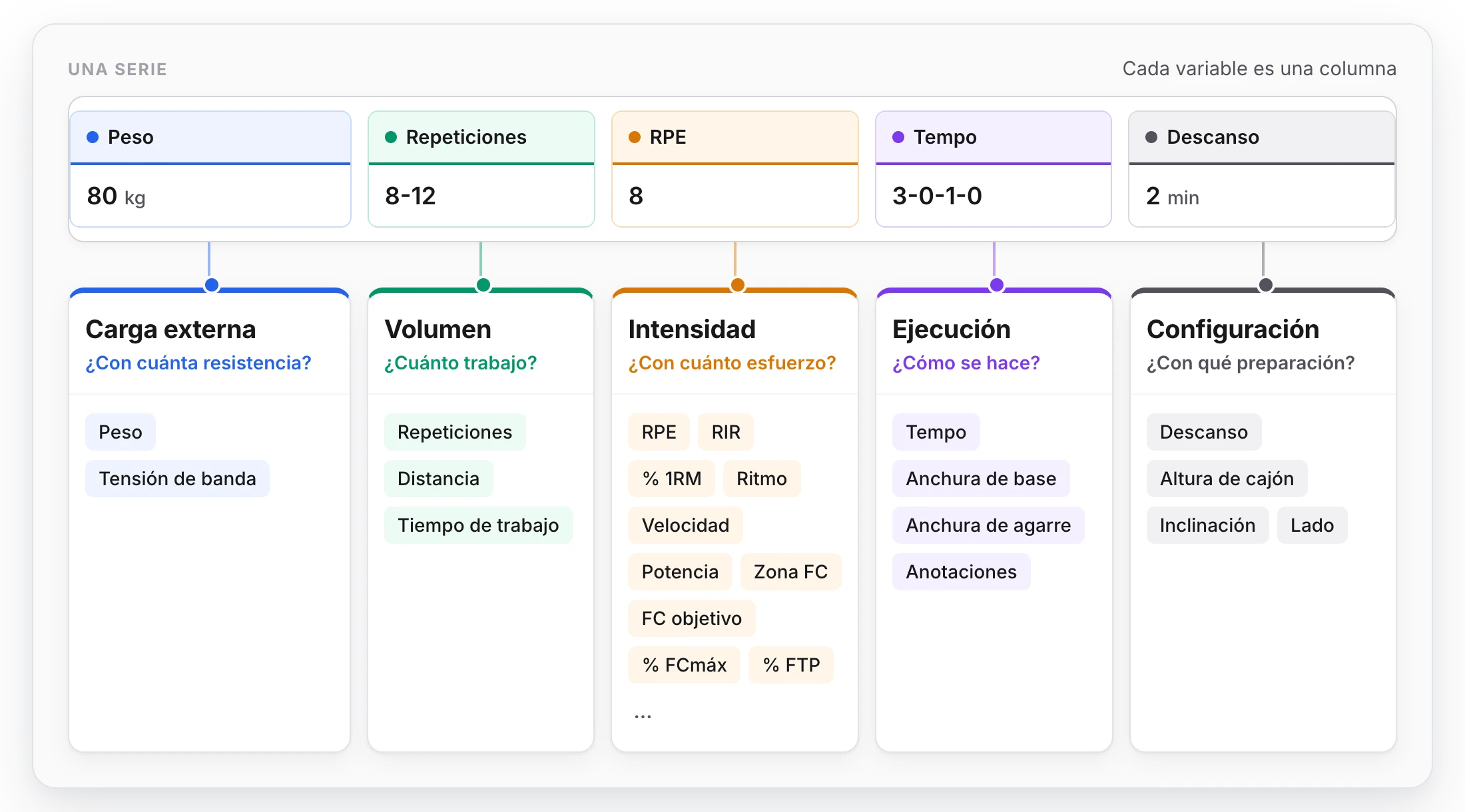
Five categories, five questions about each set.
The five categories
| Category | Answers | Variables |
|---|---|---|
| External load | How much resistance? | Weight, band tension |
| Volume | How much work? | Reps, distance, work time |
| Intensity | How much effort? | RIR, RPE, % 1RM, HR zone, target HR, pace, velocity, power and the percentages of the athlete's maximums |
| Execution | How is it done? | Tempo, stance width, grip width, notes |
| Setup | With what preparation? | Rest, box height, incline, side |
A well-prescribed set usually combines one volume variable (how much) with one load or intensity variable (how demanding), and adds execution or setup only when they bring something.
Almost every variable accepts an exact value (10 reps) or a range (8-12 reps), and the unit is chosen column by column.
External load: how much resistance?
The resistance applied to the movement from outside.
| Variable | What it indicates | Units |
|---|---|---|
| Weight | Weight or external resistance applied to the exercise | kg, lb, stone |
| Band tension | Resistance provided by elastic bands | kg, lb |
- Weight is the usual variable in strength: barbell, dumbbells, machine, added load.
- Band tension is for when the resistance comes from a band, on its own or on top of a weight.
Load columns have an option of their own: being calculated from a percentage of the client's 1RM. You prescribe the percentage and TrainerStudio shows the kilos. It is explained in Calculate weight from 1RM.
Volume: how much work?
The amount of work in the set. It is the category that changes most between disciplines.
| Variable | What it indicates | Units |
|---|---|---|
| Reps | Number of times the movement is performed | reps |
| Distance | Total distance covered | m, km, mi, yd, ft |
| Work time | Duration of the set's active work | s, min, h |
- Reps for strength and any exercise that is counted.
- Distance for running, cycling, swimming, rowing, sleds or farmer's walks.
- Work time to prescribe by duration: a 40-minute easy run, a 30-second plank, a 20-second sprint.
Intensity: how much effort?
How demanding the set is. There are three families, depending on how you prefer to measure it.
Perceived effort
| Variable | What it indicates | Units |
|---|---|---|
| RPE | Perceived effort, from 1 to 10 | scale |
| RIR | Reps in reserve: how many would be left before failure (0-10) | reps |
They do not need any prior data from the client. RPE works for any discipline; RIR is specific to strength. They are two ways of saying the same thing: RIR 2 is roughly equivalent to RPE 8.
Objective measures
| Variable | What it indicates | Units |
|---|---|---|
| Pace | Time per unit of distance | min/km, min/mi, min/100m, min/500m |
| Velocity | Distance per unit of time | m/s, km/h, mph |
| Power | Power output | W, W/kg |
| Target HR | A specific heart rate | bpm |
| HR zone | Target heart rate zone, from zone 1 (recovery) to 5 (maximum) | zone, % |
- Pace is written the way you would say it out loud:
5:30is 5 minutes and 30 seconds per kilometer. Usemin/kmormin/mifor running,min/100mfor swimming andmin/500mfor rowing. - Velocity in
km/his handy for the treadmill or the bike; inm/sit is used for velocity-based strength training on the bar. - Power in watts for cycling or rowing with a power meter;
W/kgto compare it between athletes. - HR zone and Target HR for cardiovascular work guided by a heart rate monitor.
Percentages of the athlete's maximums
| Variable | What it indicates | Discipline |
|---|---|---|
| % 1RM | Percentage of the one-rep max | Strength |
| % Max HR | Percentage of maximum heart rate | Any cardiovascular work |
| % HRR (Karvonen) | Percentage of heart rate reserve | Any cardiovascular work |
| % FTP | Percentage of functional threshold power | Cycling, rowing |
| % Critical velocity | Percentage of critical velocity | Running, swimming |
| % Maximum velocity | Percentage of the athlete's maximum in that discipline | When none of the above applies |
They let you prescribe the same thing to a whole group ("at 85% of FTP") and have each client get their own level of demand. For TrainerStudio to translate them into load it needs each client's maximums, which are saved once in their fitness profile.
Execution: how is it done?
How the movement should be performed.
| Variable | What it indicates | Units |
|---|---|---|
| Tempo | Seconds for each phase of the movement | — |
| Stance width | Distance between the feet | cm, in |
| Grip width | Distance between the hands on the bar | cm, in |
| Notes | Free text for the set | — |
- Tempo is four numbers: eccentric phase, pause at the bottom, concentric phase and pause at the top.
3-0-1-0means lowering in 3 seconds, no pause, lifting in 1 and no pause at the top. - Stance width and grip width are used to pin down a specific variant (sumo squat, close-grip press) or for rehab.
Notes: free text in each set
Notes is the only variable where you write text instead of a number. It is for everything that does not fit anywhere else:
- "Per leg", "slow lowering", "to technical failure".
- "30 easy minutes, RPE 5-6", if you prefer to prescribe in prose.
- A different instruction for a specific set: "last one, no belt".
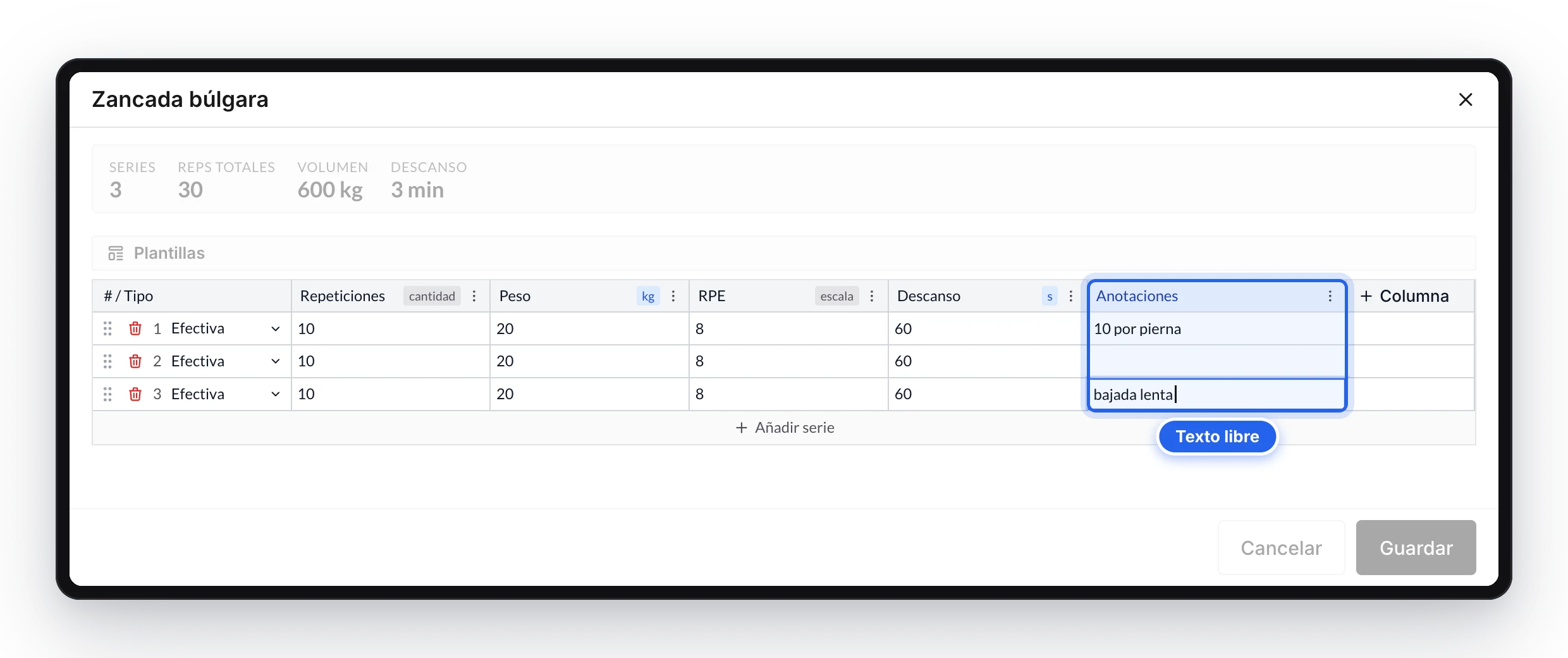
Notes go set by set, in the last column.
How it works:
- It is the last column of a new exercise and starts empty. If you do not need it, leave it blank or delete it.
- It accepts up to 280 characters per set.
- It has no unit and no exact value or range option.
- Your client reads it exactly as you write it: in the exercise summary and, when logging the workout, right below the set it belongs to. They do not have to fill it in.
- It is not interpreted. It does not count towards volume, load, records or progression. If you want a piece of data to feed the statistics, put it in its own variable (reps, weight, time…) and keep notes for the nuances.
- In the PDF and Excel export it appears as the last column of the row.
Notes or instructions: the exercise instructions apply to the whole exercise (technique, equipment, how to set up). Notes go set by set.
Setup: with what preparation?
The context of the set: equipment and recovery.
| Variable | What it indicates | Units |
|---|---|---|
| Rest | Recovery time between sets | s, min |
| Box height | Height of the box for jumps or step-ups | cm, in |
| Incline | Treadmill gradient or bench angle | %, degrees |
| Side | Side of the body in unilateral exercises | — |
- Rest is the most used: it sets the recovery after each set.
- Incline in
%for a treadmill gradient and in degrees for a bench. - Side can be left, right, bilateral or alternating.
Which variables to use in each discipline
There is no "mode" per sport: you choose the columns that describe the set. These combinations are a good starting point.
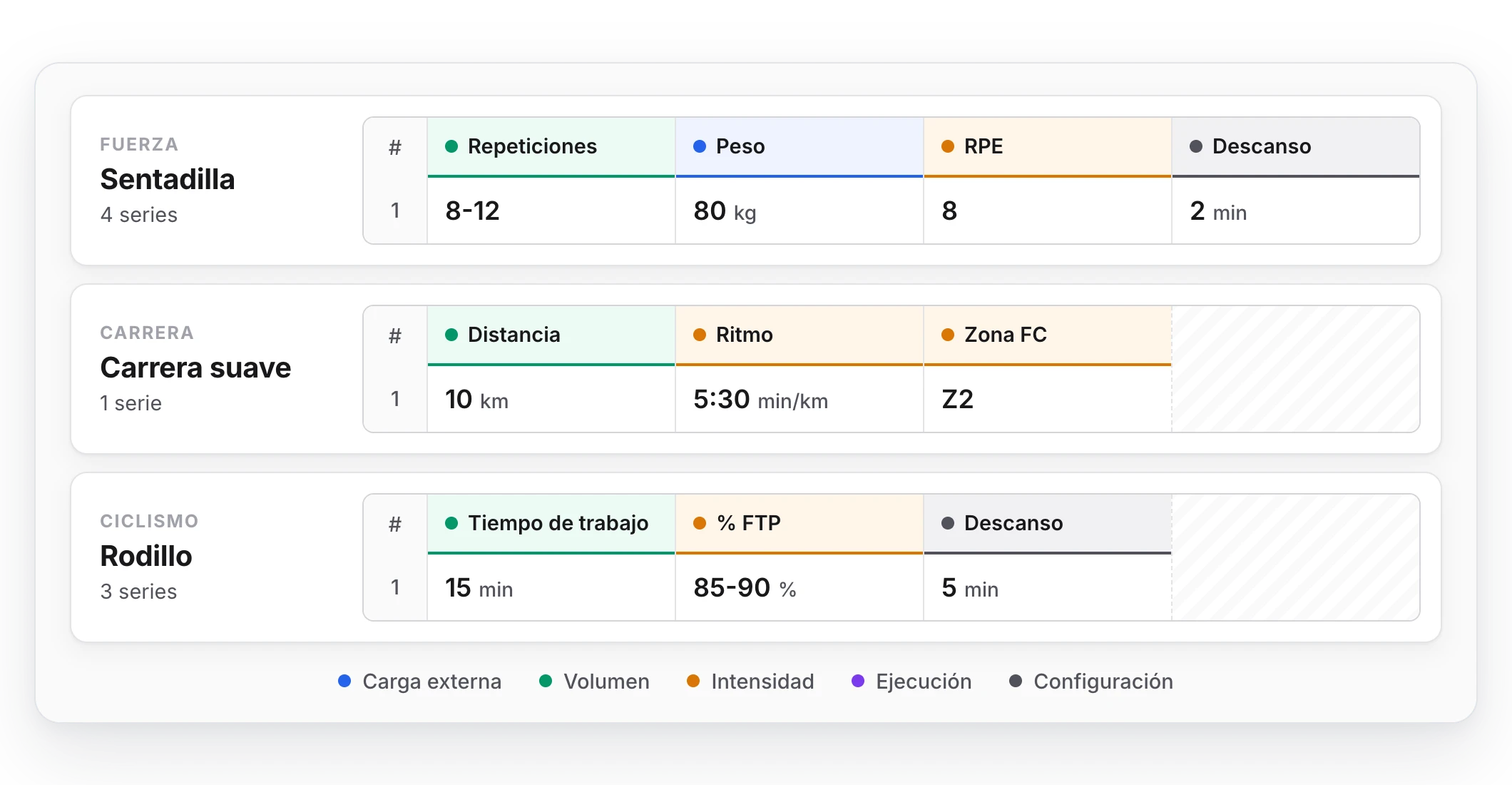
The same editor, different columns.
| Discipline | Volume | Load or intensity | Others |
|---|---|---|---|
| Strength | Reps | Weight + RPE or RIR, or % 1RM | Rest, tempo |
| Continuous running | Distance or work time | Pace, HR zone | — |
| Intervals | Distance or work time | Pace or % critical velocity | Rest |
| Cycling | Work time | % FTP, power or % max HR | Rest |
| Swimming | Distance | Pace (min/100m) | Rest |
| Rowing | Distance or work time | Pace (min/500m) or power | Rest |
| Treadmill | Work time | Velocity | Incline |
| Isometrics | Work time | RPE | Rest |
| Plyometrics | Reps | — | Box height, rest |
| Unilateral | Reps | Weight | Side, notes |
Examples
Squat — 4 sets
| Reps | Weight | RPE | Rest |
|---|---|---|---|
| 8-12 | 80 kg | 8 | 2 min |
Easy run — 1 set
| Distance | Pace | HR zone |
|---|---|---|
| 10 km | 5:30-5:45 min/km | Zone 2 |
400 m repeats — 8 sets
| Distance | Pace | Rest | Notes |
|---|---|---|---|
| 400 m | 4:00 min/km | 90 s | Walk to recover |
Indoor trainer, tempo — 3 sets
| Work time | % FTP | Rest |
|---|---|---|
| 15 min | 85-90% | 5 min |
Continuous swim — 6 sets
| Distance | Pace | Rest |
|---|---|---|
| 200 m | 1:50 min/100m | 30 s |
Plank — 3 sets
| Work time | Rest |
|---|---|
| 40 s | 45 s |
Bulgarian split squat — 3 sets
| Reps | Weight | Side | Notes |
|---|---|---|---|
| 10 | 20 kg | Alternating | 10 per leg, keep hold of the dumbbells |
What TrainerStudio does with each variable
Prescribing with structured variables, and not just text, is what lets TrainerStudio calculate for you:
- Volume and intensity of each session and how they evolve over time.
- Comparison between what was prescribed and what was done in each set.
- Progress and records per exercise. See Log exercise weight and track progress.
- Load control, which combines strength and endurance volume and intensity on a single scale. See Load control.
| Category | Does it go into the calculations? |
|---|---|
| External load | Yes |
| Volume | Yes |
| Intensity | Yes |
| Execution | No: it describes how the set is done |
| Setup | No: it describes the context of the set |
Frequently asked questions
Do I have to use every variable?▼
No. Use the ones that describe the set and delete the rest so your client only sees what matters.
RPE or RIR?▼
Whichever your client uses most naturally. RIR only makes sense in strength; RPE works for everything.
Pace or velocity?▼
Pace if your client thinks in "minutes per kilometer" (running, swimming, rowing); velocity if they think in "kilometers per hour" (treadmill, bike).
What happens if I prescribe a % FTP and the client has no FTP recorded?▼
The set is prescribed and shown the same way, but TrainerStudio cannot translate it into load until you fill in their fitness profile.
Can I create my own variables?▼
No. For anything that does not fit the catalog, there are notes.
Related guides
How to prescribe exercises with sets and training variables
When you add an exercise for a client you decide its sets and what is measured in each one. Learn to use the set editor to prescribe strength with reps and weight, or endurance with minutes, distance and pace.
Export workouts to PDF and Excel
Download library programs and client plans as PDF or Excel files: format, period, contents, and steps to save or share the file.