
How to archive and delete a client?
When a client stops training with you, archive them: they stop getting reminders, can't log in to the app and don't take up a slot in your plan. If you also want them gone from your list for good (a test client, a duplicate or a mistyped email), delete them from Archived.
Active, archived and deleted
| Status | Your client | You |
|---|---|---|
| Active | Uses the app and gets their reminders. | See them under Active and work with them. |
| Archived | Can't log in to the app and gets no reminders or notifications. | See them under Archived and can reactivate them anytime. |
| Deleted | Can't log in to the app. | They disappear from your list and their email is free. |
You can only delete an archived client. Archive first, then delete if you want to.
Archive a client
- In Clients, find the client in the Active list.
- Click Options on their row and choose Archive client.
- Check the confirmation window: it tells you what will be canceled.
- Click Archive.
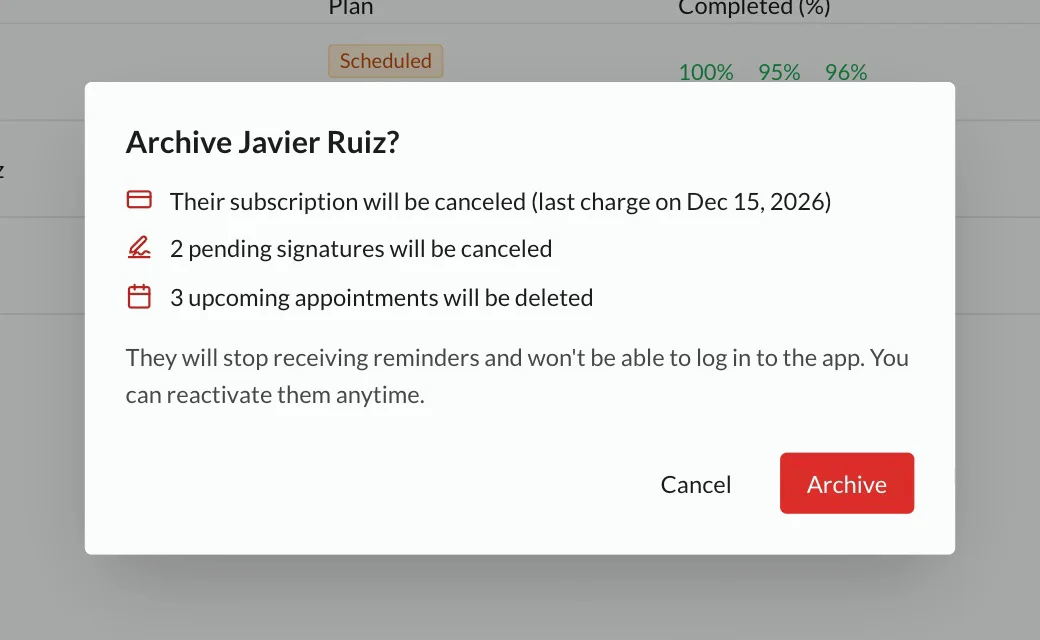
Before archiving you see what gets canceled. If nothing is pending, you only see the note that they will stop getting reminders.
To archive several clients at once, select them and use Archive selected in the bulk actions. The effect is the same.
What is paused while they are archived
This comes back only when you reactivate them:
- Access to the app. If they try to log in, they will see that their account is deactivated.
- Workout reminders, on WhatsApp and as notifications.
- Push notifications, such as alerts for your messages.
- Reminders that their access to a product is about to end.
The chat stays open for you, but your client won't see your messages while they are archived.
What is canceled when you archive
This does not come back when you reactivate them:
- Their paid subscription (Stripe charges): it is canceled at the end of the period they already paid for. They are not charged again. The window shows the date of the last charge.
- Their manual subscriptions: they stop creating new fees.
- Pending signatures: documents they haven't signed are canceled.
- Their upcoming appointments in the calendar: they are deleted.
Their workouts, metrics, photos, notes, messages and signed documents are kept.
Automatic archiving. If TrainerStudio archives clients for you (for example, when you move to a lower plan or when their access to a product they bought from you ends), only the items in the first list are paused. No charge, signature or appointment is canceled.
Reactivate an archived client
- In Clients, switch the filter from Active to Archived.
- Click Options on their row and choose Activate client.
They take up a slot in your plan again. They get back access to the app, reminders for their upcoming workouts and notifications. What was canceled when you archived them doesn't come back: if you want, sell them their product again, send the documents again or book new appointments.
Delete a client
- In Clients, switch the filter to Archived.
- Click Options on their row and choose Delete client.
- Confirm with Delete.
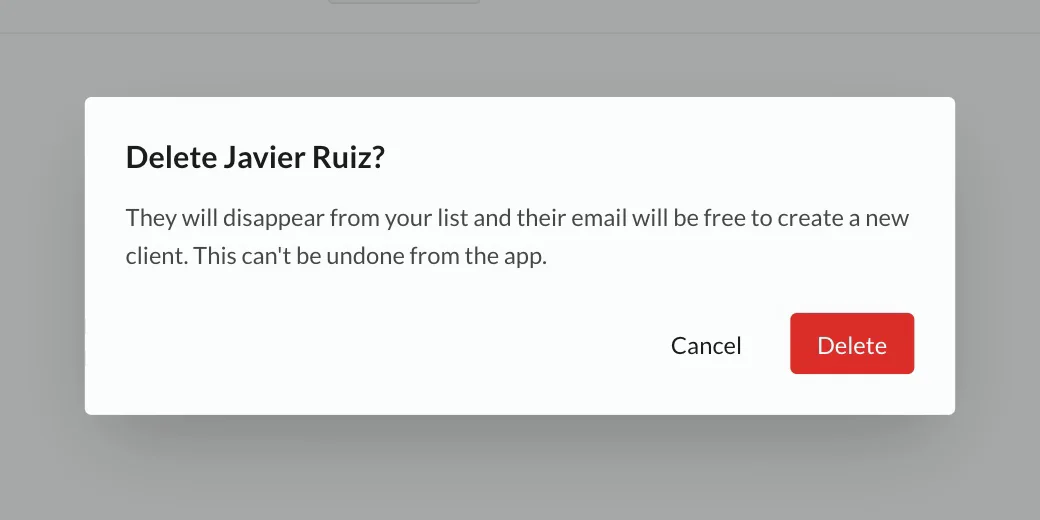
When you delete them:
- They disappear from your list, from both Active and Archived.
- Their email is free. You or another coach can create a new client with that email. It starts from scratch, without the previous client's history.
- Their access link and their session stop working.
- No data is erased. Everything is kept, but you no longer see it in the app.
It can't be undone from the app. If you deleted a client by mistake, write to us from Help: support can restore them and they show up again under Archived, as long as nobody has used their email yet.
Who can archive and delete
- You, as the account owner, for any client.
- Your employees with the permission to edit assigned clients, only for the clients assigned to them. Other employees don't see the option. More in How to manage employees?.
Frequently asked questions
Can I delete an active client?
No. Archive them first. That way everything they had running (reminders, charges, signatures and appointments) is already stopped when you delete them.
Does deleting free up a slot in my plan?
The slot is freed when you archive. Archived clients don't take up a slot, so deleting changes nothing in your plan.
Do they get back what they already paid?
No. The subscription is canceled at the end of the paid period: your client keeps what they paid for until that date and is not charged again.
I had archived clients who are still paying. Are they canceled automatically?
No. Only the subscriptions of clients you archive from now on are canceled. If a client you archived earlier is still paying, check their subscription in Subscriptions.
When I create a client it says the email is already registered
Look for that email under Active and Archived. If the client is archived, reactivate them to keep working together, or delete them to create a new client with that email.
Additional resources
- How to create clients?
- How to organize your clients into groups?: bulk actions, including archiving
- How to manage your subscription?: slots and active clients
- How to manage employees?