
GuidesHow to organize your library with folders?
How to organize your library with folders?
As your library grows, a long list of templates gets hard to scan. With folders you group your programs, sessions and blocks the way you like: by phase, by condition, by client type or by part of the session.
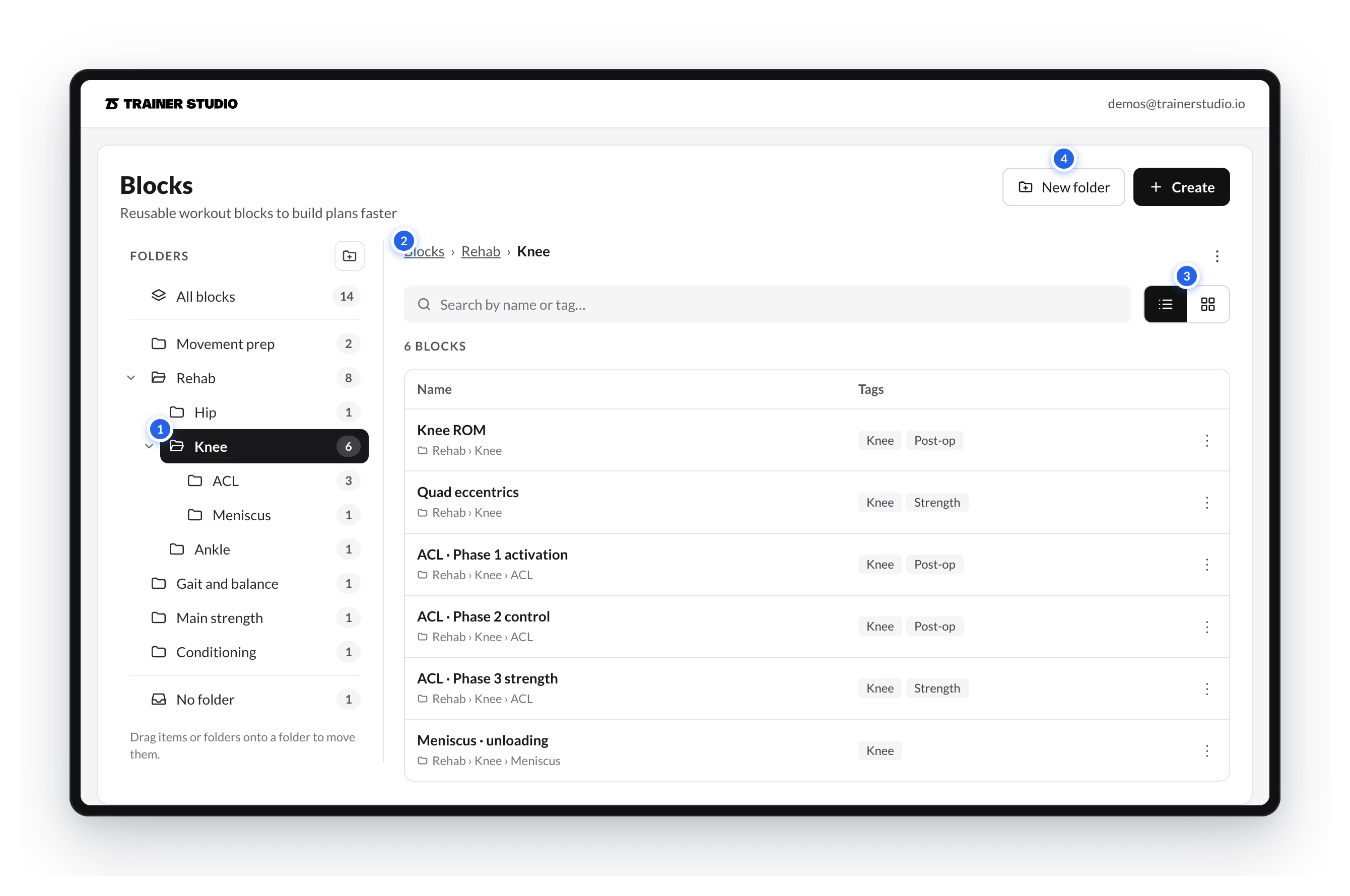
How they work
- Each library has its own tree. The folders in Programs, Sessions and Blocks are independent.
- You can nest them: Rehab › Knee › ACL.
- Each template lives in one folder at most. Templates without a folder show up in No folder.
- Your existing templates start in No folder. Nothing moves until you move it.
- Deleting a folder never deletes templates: its content moves up one level.
In this guide
- Create and browse folders
- Move, rename and delete
- Search and use your folders while planning
- In the mobile app
- Folders or tags: ideas to get organized
You may also be interested in
How to create and assign programs?
Build reusable multi-week programs in your library, organize them and assign them to one or several clients by choosing the start date and start day.
Create and browse folders
How to create folders and subfolders in your programs, sessions or blocks library and how to move around them with the tree, the path and the list and grid views.