
8. Advanced Sets
In addition to providing free-text instructions for each exercise, you can log workouts with structured variables to obtain advanced statistics and perform effective load management.
Available Variables
To obtain advanced statistics and perform effective load management, TrainerStudio uses structured variables organized into categories. The system uses the external load, volume, and intensity variables to calculate metrics such as total tonnage, average load, and planned vs. actual load.
View all available variables
Category | Variable | Description | Units |
|---|---|---|---|
| LOAD | Weight | Weight or external resistance applied to the exercise | kg, lb, stone |
Band tension | Resistance provided by elastic bands | kg, lb | |
| VOLUME | Reps | Number of repetitions performed | count |
Distance | Total distance covered during the exercise | m, km, mi, yd, ft | |
Time | Duration of active work during the exercise or set | s, min, h | |
| INTENSITY | RIR | Reps In Reserve - Repetitions remaining before failure (0-10) | count |
RPE | Rate of Perceived Exertion - Perceived effort level (1-10) | scale | |
% 1RM | Percentage of one-rep maximum | % | |
Heart rate zone | Target heart rate zone as a percentage of maximum or reserve | zone, % | |
Target heart rate | Specific target heart rate in beats per minute | bpm | |
Pace | Speed expressed as time per unit of distance (e.g., minutes per kilometer) | min/km, min/mi, min/100m, min/500m | |
Speed | Movement speed expressed as distance per unit of time | m/s, km/h, mph | |
| EXECUTION | Tempo | Tempo code in ecc-bot-con-top format (e.g., 3-0-1-0) | code |
Stance width | Distance between the feet during the exercise | cm, in | |
Grip width | Distance between the hands on the bar or implement | cm, in | |
| SETUP | Rest | Recovery time between sets or exercises | s, min |
Box height | Height of the box or platform for box jumps or step-ups | cm, in | |
Incline | Upward incline angle of the surface (treadmill, bench, etc.) | %, deg | |
Side | Body side for unilateral exercises (left, right, or bilateral) | code |
How to Use
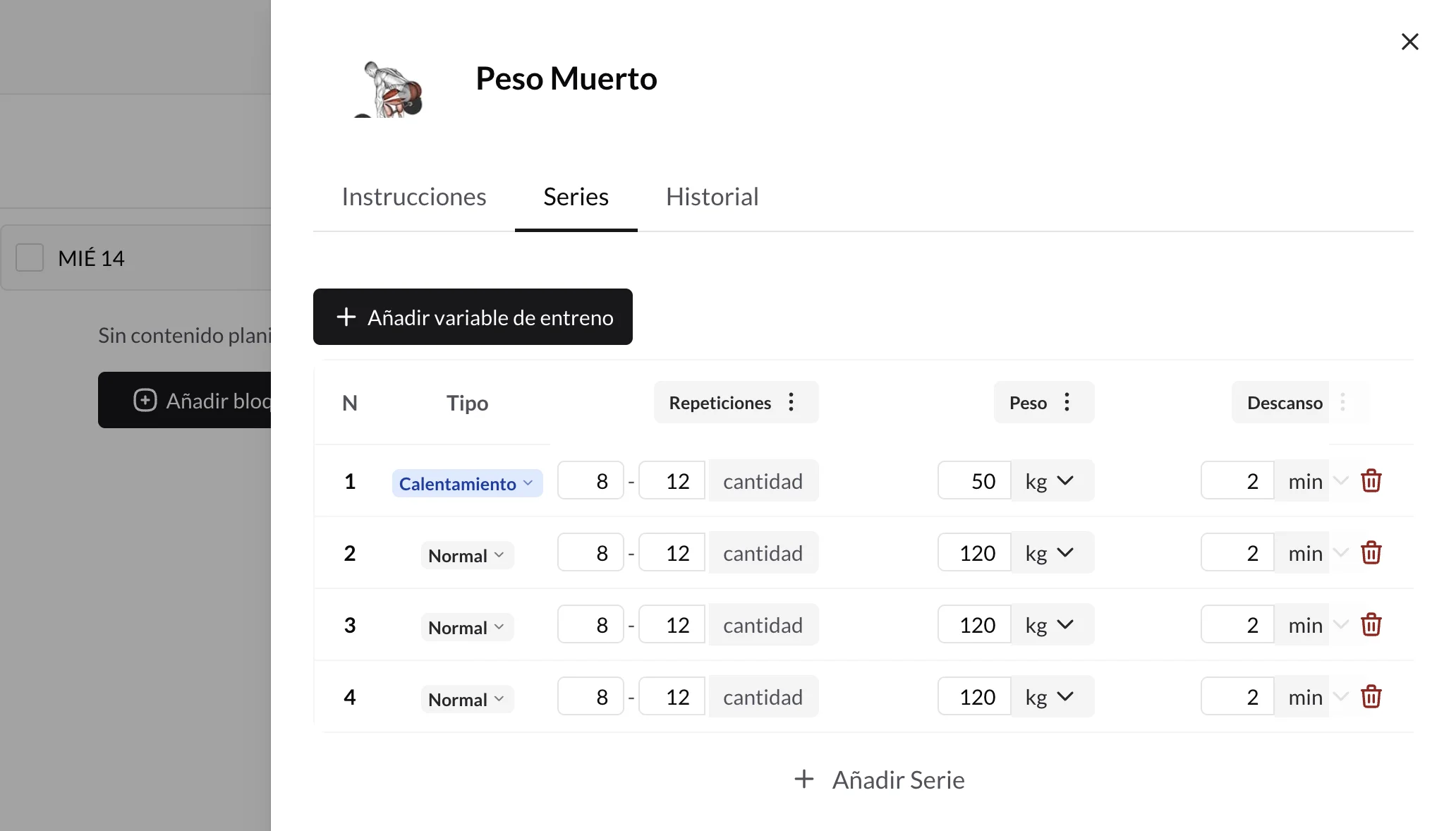
- Add an exercise to the client's workout
- Write instructions (optional) in the free-text field to give technique or execution cues
- Configure the sets:
- Standard sets: Select the prescription type and fill in the fields
- Custom sets: Select the variables you need from the catalog using the "+ Add training variable" button and configure exact values or ranges
- Review and save the exercise
When you log workouts with structured variables, TrainerStudio automatically calculates advanced statistics such as total volume, average load, progression, and volume and intensity trends over time.
Practical Examples
Example 1: Traditional Training
Exercise: Squat
Instructions: "Keep your chest up and lower until your thighs are parallel to the floor."
Sets: 4 sets × 8-12 reps @ 100kg, rest 3 minutes
Logged variables: Reps: 8-12, Weight: 100kg, Rest: 3 minutes
Example 2: Autoregulated Training
Exercise: Bench Press
Instructions: "Control the descent speed. Pause for 1 second at the chest."
Sets: 3 sets × 8-10 reps @ RIR 2-3, rest 2 minutes
Logged variables: Reps: 8-10, RIR: 2-3, Rest: 2 minutes
Example 3: Custom Sets
Exercise: Deadlift
Instructions: "Keep the bar close to your body throughout the movement."
Sets: 3 sets × 5 reps @ 120kg, velocity 0.8-1.0 m/s, RIR 2
Logged variables: Reps: 5, Weight: 120kg, Velocity: 0.8-1.0 m/s, RIR: 2