
Advanced nutrition
With advanced nutrition you stop sending one-off diets by PDF or message and build structured, reusable plans: you define your foods, combine them into recipes, group those recipes into day-by-day plans with calorie and macro targets, and assign them to each client. They see everything in their app, with the amounts, the macros and the details of each recipe.
It all rests on a simple idea: build once, reuse forever. A food you create today works for any recipe; a recipe works for any plan; a plan can be assigned to any clients you want and adjusted per person without touching the original.
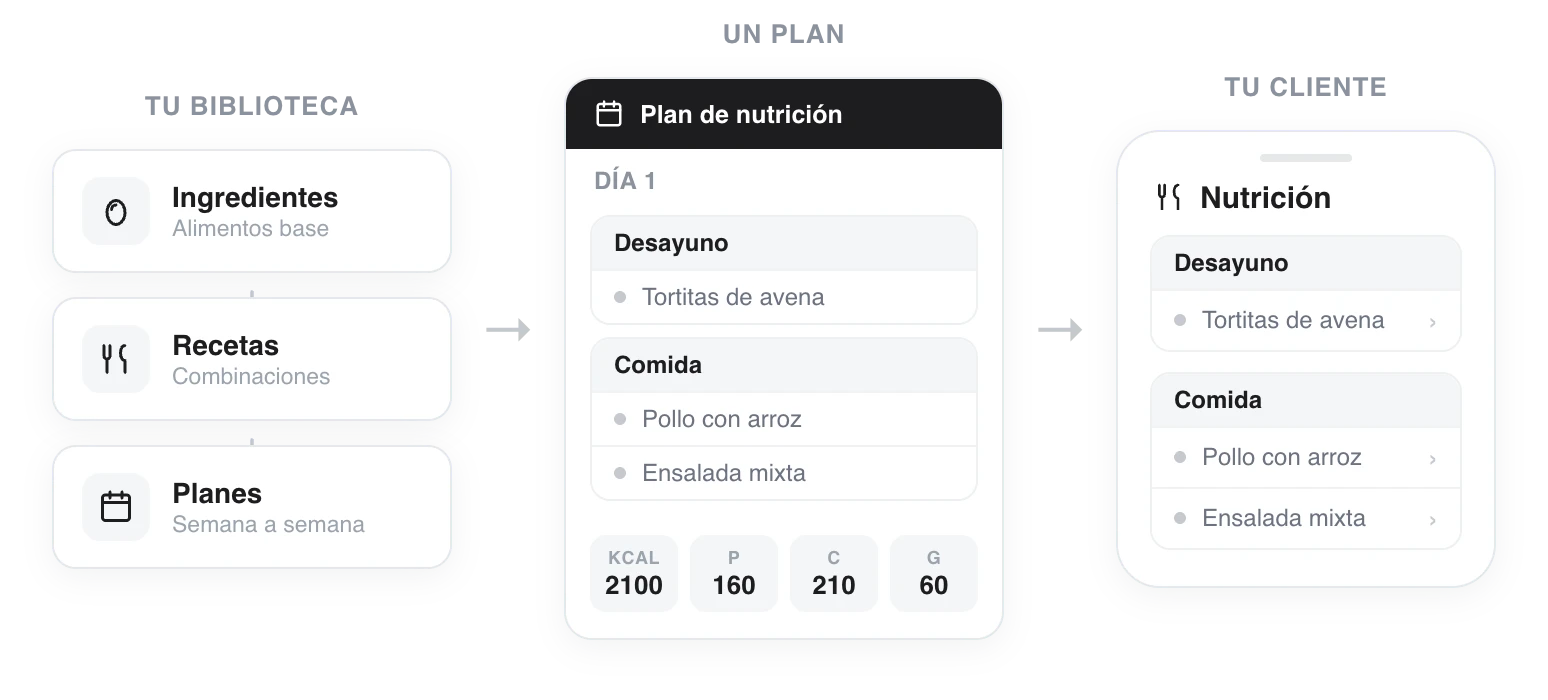
From the library to the client: ingredients make up recipes, recipes make up plans and the plan reaches your client's app.
The three pieces of your library
- Ingredients — your food database with macros per 100 g. You create them by hand or pick them from the shared BEDCA and Open Food Facts library.
- Recipes — combinations of ingredients with their amounts in grams; the macros are calculated automatically.
- Nutrition plans — several days with meal blocks (breakfast, lunch, dinner...), fixed recipes or options to choose from, and calorie and macro targets.
And then, to your clients
- Assign nutrition to a client — load a plan from the library or create a custom one, with per-person targets and recipes customized just for that client.
- What your client sees — how they follow their plan from the app: days, meals and the details of each recipe with its macros.
When the plan is ready, you can export it to PDF so your client can print it and keep it handy in the kitchen.
If it is your first time, the natural order is top to bottom: create a few foods, build a recipe, put together a plan and assign it. You do not need everything perfect from the start; you can begin with a simple plan and grow your library over time.
Attach a PDF
Upload your client's diet as a PDF file and they can view and download it from their app. Ideal if you already have the plan in a document.
Ingredients, your food library
Build your food database with calories and macros per 100 g and make use of the shared BEDCA and Open Food Facts library. Ingredients are the foundation of all your recipes and nutrition plans.