
Layer 1 · Internal load (AU)
Internal load is the overall perceived-effort number: a single figure that summarizes the whole session and lets you compare and add up very different workouts. It is based on the session-RPE method (Foster, 2001), validated in more than 200 studies and used by most professional teams in the world, with two adjustments that improve how it behaves in mixed training.
The formula
load = working_minutes × (intensity / 10)² × CA- working_minutes: duration of the exercise's active work.
- intensity: perceived effort, normalized to a 0-10 scale (see Intensity sources). It counts squared.
- CA: the exercise coefficient. It captures how stressful that exercise is per unit of work (see The CA coefficient).
The result is an arbitrary unit (AU). It does not represent real kilos or minutes: it is a relative measure that puts a squat session, a plank and a run on the same scale. (Some screens of the app label this unit UA, from the Spanish unidades arbitrarias.)
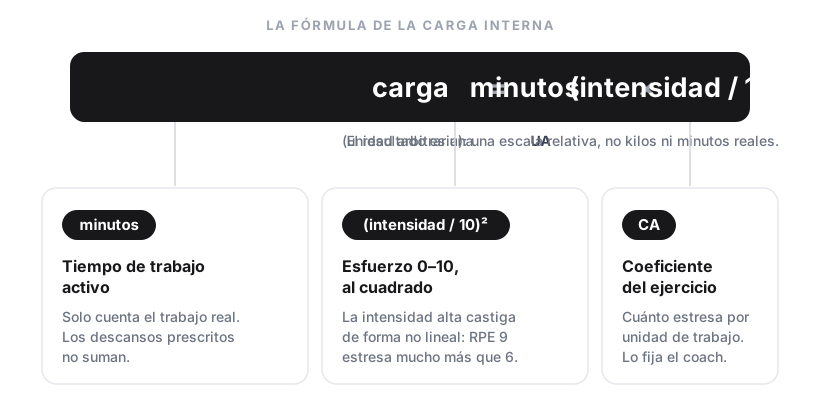
Three factors: how much you worked (minutes), how hard it was (intensity squared) and how demanding the exercise is (CA).
Why squared intensity
The original form of session-RPE (Foster) multiplies intensity linearly. In practice, RPE 9-10 stresses the body disproportionately more than RPE 6-7 — neural and metabolic fatigue do not scale linearly. Banister proposed compensating for this with an exponential curve (TRIMP, I × e^(b·I)), but its teaching complexity outweighs the benefit in day-to-day practice.
TrainerStudio takes the middle ground: squared intensity. It is trivial to explain (anyone understands x²), it captures the non-linear penalty at high intensities without overcomplicating things, and it produces ratios between sessions that match an experienced coach's intuition:
| RPE difference | Linear | Squared |
|---|---|---|
| RPE 5 → 7 | +40% | +96% |
| RPE 7 → 9 | +29% | +65% |
| RPE 8 → 10 | +25% | +56% |
How minutes are calculated for each exercise
Each exercise has a load mode that defines how its volume is measured:
| Mode | Who uses it | Minutes calculation |
|---|---|---|
| Reps | Strength, plyometrics | sets × reps × 10 / 60 |
| Time | Isometrics, timed cardio | sets × seconds / 60 |
| Distance | Distance-based cardio | sets × (distance_km × pace_s_per_km) / 60 — requires pace logged in the set |
The 10-second-per-rep constant is not the movement tempo — it is the total time a rep takes, counting setup, breathing, breath-hold and reset. A heavy squat with a controlled tempo is ~5 s of movement, but before and after there is mental preparation and breathing that also count as active effort. 10 s is a reasonable average for any strength or plyometric exercise.
Prescribed rest between sets is not included in the working minutes. Only active time is counted.
What to read next
Internal load is always interpreted together with external metrics — especially in maximal strength, where a 1RM adds little AU but has a huge impact. To understand where the intensity number comes from, see Intensity sources; for the CA factor, The CA coefficient.
Break load down by groups
The load control breakdown in TrainerStudio is a custom dashboard — group whatever exercises you want and measure what matters for each group (internal load, tonnage, minutes, distance, sets or reps), with step-by-step examples.
Layer 2 · External metrics
Tonnage, minutes, distance and reps — the real physical-work metrics TrainerStudio shows alongside AU load so you can program specific volume.