
Intensity sources
Internal load needs an intensity value, but that value can come from very different references depending on the discipline: RPE in strength, %HRmax in cardio, %FTP on the bike. TrainerStudio normalizes any of them to a common 0-10 scale so they all fit into the same formula.
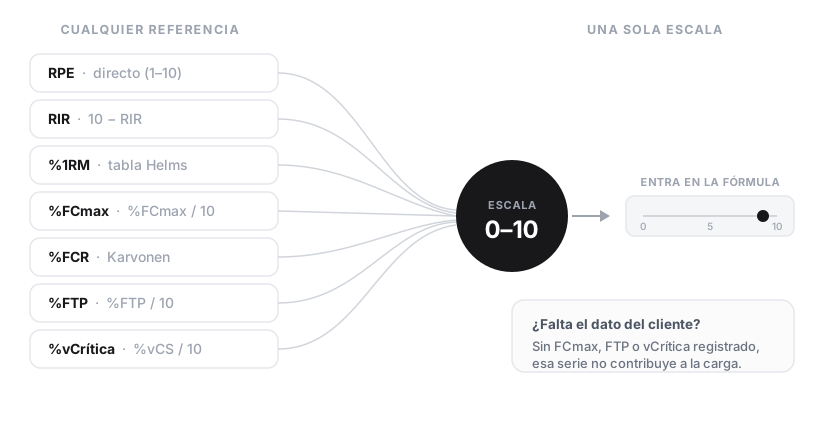
No matter where the intensity comes from: it all ends up on a common 0–10 scale. If the data that reference needs is missing, the set does not contribute to load.
| Reference | How it is normalized | Prerequisite |
|---|---|---|
| RPE (1-10) | RPE directly | None |
| RIR (reps in reserve) | 10 − RIR (clamped to [0, 10]) | None |
| %1RM | Helms-Reynolds table based on reps | Prescribed reps (does not apply to sets without reps) |
| %HRmax | %HRmax / 10 | Client's HRmax (measured or estimated as 220−age) |
| %HRR (Karvonen) | ((HR − HRrest) / (HRmax − HRrest)) × 10 | Client's HRmax + resting HR |
| %FTP (bike power) | %FTP / 10 (capped at 10) | Client's FTP |
| %critical velocity (running) | %vCS / 10 | Client's critical velocity |
| %Vmax / %Pmax | % / 10 | Athlete's maximum for that discipline |
When a reference requires client data (HRmax, FTP, etc.) and that data is not recorded, the set does not contribute to AU load. TrainerStudio does not assume default values — we prefer to show "known real" load rather than make up numbers that distort the trends.
The %1RM case is not linear: 80% for one rep is roughly RPE ~6, while 80% for eight reps is RPE ~9-10. The Helms-Reynolds table takes this into account and is used internally.
What to read next
Once you have intensity on a 0-10 scale, it goes into the internal load formula squared. The other factor you decide is the exercise's CA coefficient.
Layer 2 · External metrics
Tonnage, minutes, distance and reps — the real physical-work metrics TrainerStudio shows alongside AU load so you can program specific volume.
Layer 3 · Derived indicators
ACWR, monotony and strain — the risk and variability indicators derived from accumulated AU load to decide on deloads and prevent injuries.