
Fill in the client's fitness profile
For strength exercises, RPE or %1RM is enough, and you do not need anything from the client. But for cardio and endurance sports (running, cycling, swimming, rowing), intensity is measured as a % of one of the athlete's maximums: %HRmax, %FTP, %critical velocity… TrainerStudio needs those maximums to translate those percentages to the 0–10 load scale.
That data is saved once in the client's fitness profile.
Where to fill it in
Open the client, go to the Advanced data tab and you will see the Fitness Profile card.
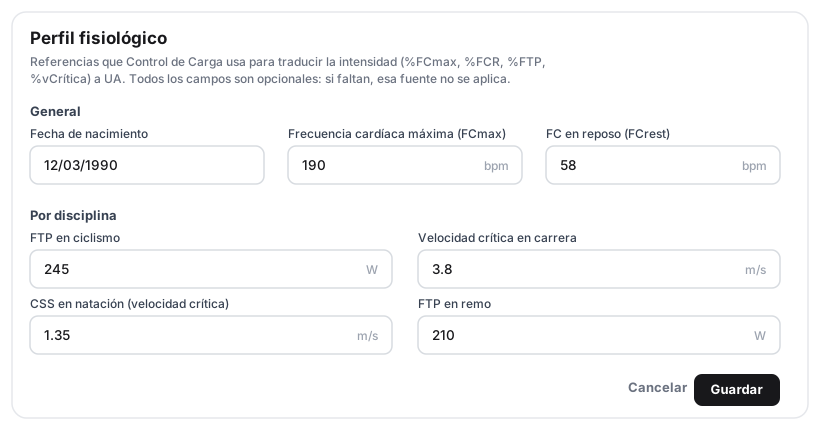
All fields are optional. Only fill in the ones for the disciplines you program for that client.
General
| Field | Unit | What it is used for |
|---|---|---|
| Birthday | — | Estimates HRmax (220 − age) if you do not measure it. |
| Max heart rate (HRmax) | bpm | Required for %HRmax and %HRR. |
| Resting HR | bpm | Required (together with HRmax) for %HRR (Karvonen). |
Per discipline
| Field | Unit | What it is used for |
|---|---|---|
| Cycling FTP | W | Required for %FTP intensities on the bike. |
| Running critical velocity | m/s | Required for %critical velocity when running. |
| Swimming CSS | m/s | Critical swim speed for swimming intensities. |
| Rowing FTP | W | Required for %FTP intensities in rowing. |
How it relates to load
Each field unlocks an intensity source. If you program a bike set at 85% FTP and the client has no FTP recorded, that set cannot be converted to AU and does not count towards load — TrainerStudio never makes up a default value. You will see it as a warning on the load control page, with a shortcut back here. The full reference → required data map is in Intensity sources.
Fill in the fields, press Save, and from then on all of that client's sessions in those disciplines will start contributing to load.
Good to know
- Only what you use. If a client only does strength work, you do not need to fill in anything here. Fill in FTP or critical velocity only if you program cycling, running, swimming or rowing for them by percentages.
- No made-up data. An empty field means "that intensity source does not apply", not a default value. It is better to show real, known load than to distort the trends.
- It is filled in once. The profile stays with the client; you only update it when their maximums change (a new FTP test, a new HRmax, etc.).
Configure an exercise for load control
How to set an exercise's load mode, CA coefficient and discipline in TrainerStudio so it counts towards the client's load control.
Read the load control page
Guide to the client's load control page in TrainerStudio — Charts and Tables tabs, period controls, period totals and warnings about sets that are not counted.